Task Studio — A Simple Way to Keep Track When Work Gets Busy

Have you ever been deep into a task and then someone comes along and distracts you?
You switch to another request, attend a meeting, work on something from a different project, and after some time you come back to the original task.
And then you think:
“Wait… where was I?”
I’ve been in that situation quite a few times.
When you are handling multiple projects and different tasks at the same time, it is easy to lose track of what you completed, what is still in progress, what you are waiting for, or what you were planning to do next.
Sometimes we don't forget the task.
We forget the context.
That is what made me build InsightsbyJMR Task Studio.
Why I built it
I wanted something simple where I could keep my tasks, progress and notes in one place.
Nothing complicated. Just something I could open and quickly understand what is happening.
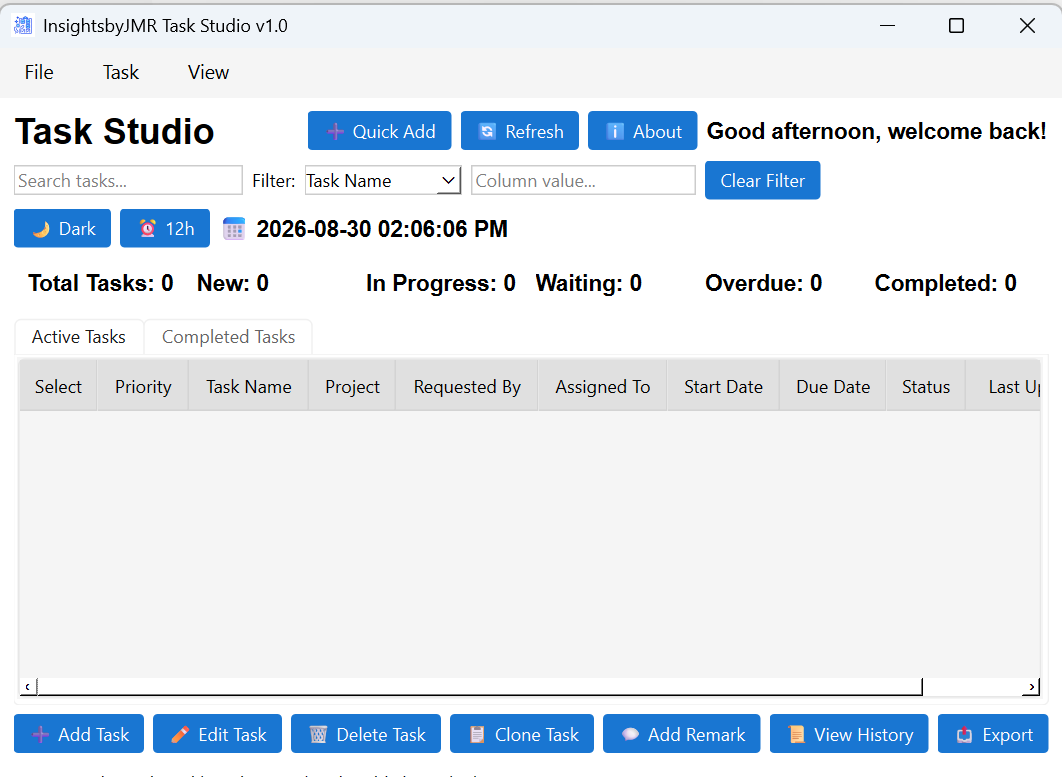
Task Studio lets me track:
📌 Projects and tasks
🔴 Priority — High, Medium or Low
🔄 Task status and progress
📅 Start and due dates
💬 Remarks and updates
📜 Task history
🔎 Search and filtering
📊 A quick dashboard of my workload
📤 Export to Excel or CSV
The application also separates Active Tasks and Completed Tasks, so completed work doesn't disappear while I'm still able to refer back to it.
One feature I particularly wanted — Remarks & History
This is probably one of my favorite parts.
If I stop working on something halfway through, I can leave myself a remark about what I did or what needs to happen next.
Later, instead of trying to remember everything, I can look back at the task history.
It's a small thing, but when you're switching between multiple tasks, those small things matter.
A quick view of where I stand
The dashboard gives me an immediate view of total tasks, new tasks, tasks in progress, waiting tasks, overdue tasks and completed tasks.
So instead of opening multiple notes or trying to remember what I was working on, I can simply open Task Studio and get a picture of my current workload.
Built for my workflow
I didn't build Task Studio to replace enterprise project-management platforms.
I built it because I wanted something that worked the way I think about my own tasks.
Especially when:
Someone interrupts you. You move to another project. A new request comes in. And three hours later you need to remember what you were doing.
For me, Task Studio is simply a way of leaving a trail for myself.
So when I come back, I know where I left off.
Try it yourself
I've decided to share Task Studio through JMR Insights so others can try it as well.
You can download the application from GitHub or visit the App Suite section of my website, where I share the scripts and applications I've built over time to make my life a little easier and simplify the everyday challenges I come across in IT.
One last thought
Productivity isn't always about doing more.
Sometimes it's about not losing track of what you're already doing.
That's the problem I wanted to solve with Task Studio.
— Jalapu Mahipal Reddy
InsightsbyJMR


Comments